Merging Multi-Source Stock Data in Python: Fixed-Width Files to JSON
Contents · 25 sections
- What the assignment asks students to build
- What is inside the supplied project
- Open the complete folder in PyCharm
- Read README.txt before writing the parser
- Step 3: turn ticker lines into a dictionary
- Step 4: read each stock file with a context manager
- Step 5: parse one line by moving a boundary
- Steps 6 and 7: validate optional selections
- Step 8: build the nested data dictionary
- Step 9: write the result to JSON
- The function signatures are part of the assignment contract
- What the supplied completed script gets wrong
- Test the contract, not just the happy path
- How to approach the finance questions without writing unsupported claims
- Three media sources need three measured variables
- Article accuracy requires a dated, testable claim
- A practical pre-submission checklist
- Common questions about this fixed-width Python project
- Why not use pandas to read the files?
- Why must the parsed values remain strings?
- Why does the duplicate INTC line not create 23 dictionary entries?
- Why does the examiner care about os.path.join()?
- Can a parser be wrong even if it returns a dictionary?
- Should the test functions remain enabled?
- Expert and source note
A practical walkthrough of a finance assignment that turns 22 fixed-width stock-price files into one validated, portable JSON dataset.
Project type: introductory Python, financial data integration, file handling, and dictionaries
Related help: Python programming assignment help
Student privacy: The student’s name, university, grade, and deadline are not published.
A file can look like a row of random digits and still contain six perfectly organised fields. That is the central challenge in this Python finance project. The supplied .dat files do not use commas, tabs, headers, or pandas. Every field occupies an exact number of characters, and the code has to slice each line in the correct order before it can combine the records.
The assignment starts with a scaffold called zid_project1.py. Students complete a series of small functions that locate the project files, read ticker-to-exchange mappings, parse fixed-width price records, validate requested inputs, assemble a nested dictionary, and write the result to JSON. The final two questions then connect the dataset to financial-media sentiment, returns, and trading volume.
This is a useful early-course project because the hard part is not a complicated library. It is respecting a contract: use the supplied function signatures, read the file description accurately, preserve strings where the docstring asks for strings, and make the paths work on both a Windows laptop and the examiner’s computer.
The walkthrough below explains that process without turning the article into a ready-to-submit assessment. Use it to understand the design, then implement and test your own scaffold according to your course rules. Our Python homework workflow is also helpful when a project separates its rubric, scaffold, test functions, and data files.
What the assignment asks students to build
The project is titled Scalable Data Integration: Merging Multi-Source Data for Financial Analytics. Its technical work is divided into nine steps:
- Build portable paths for the project folder, data folder, and ticker file.
- Describe the exact column order and field widths used by the
.datfiles. - Parse
TICKERS.txtinto a ticker-to-exchange dictionary. - Read the stock-price file for a requested ticker.
- Convert one fixed-width line into a dictionary.
- Reject invalid ticker selections.
- Reject invalid column selections.
- Combine selected records into one nested dictionary.
- Save that dictionary as JSON.
Steps 10 and 11 are short finance questions. They ask students to interpret whether negative financial reporting reflects investor opinion or adds information beyond firm fundamentals, predict what might happen to trading volume, propose media sources, discuss whether those sources are substitutes or complements, and explain how article accuracy could be assessed.
The marking design gives 60 marks to the code and 40 marks to the two open-ended questions. That balance matters: a correct parser alone is not the whole assessment.
What is inside the supplied project
The project package contains a description PDF, README.txt, TICKERS.txt, the Python scaffold, and a data folder holding one file per ticker.
| Item | Observed in the supplied project |
|---|---|
Ticker lines in TICKERS.txt | 23 |
| Unique ticker symbols | 22 |
Stock-price .dat files | 22 |
| Total daily records | 172,121 |
| Characters in every data line | 80 |
| Earliest date | January 2, 1962 |
| Latest date | October 16, 2020 |
| Smallest file | PYPL, 1,333 records |
| Largest files | DIS, GE, JNJ, KO, and PG, 14,801 records each |
The apparent mismatch between 23 ticker lines and 22 files is not a missing-file error. INTC appears twice in TICKERS.txt, both times on NASDAQ. A dictionary can hold each ticker key only once, so parsing the file naturally leaves 22 unique keys.
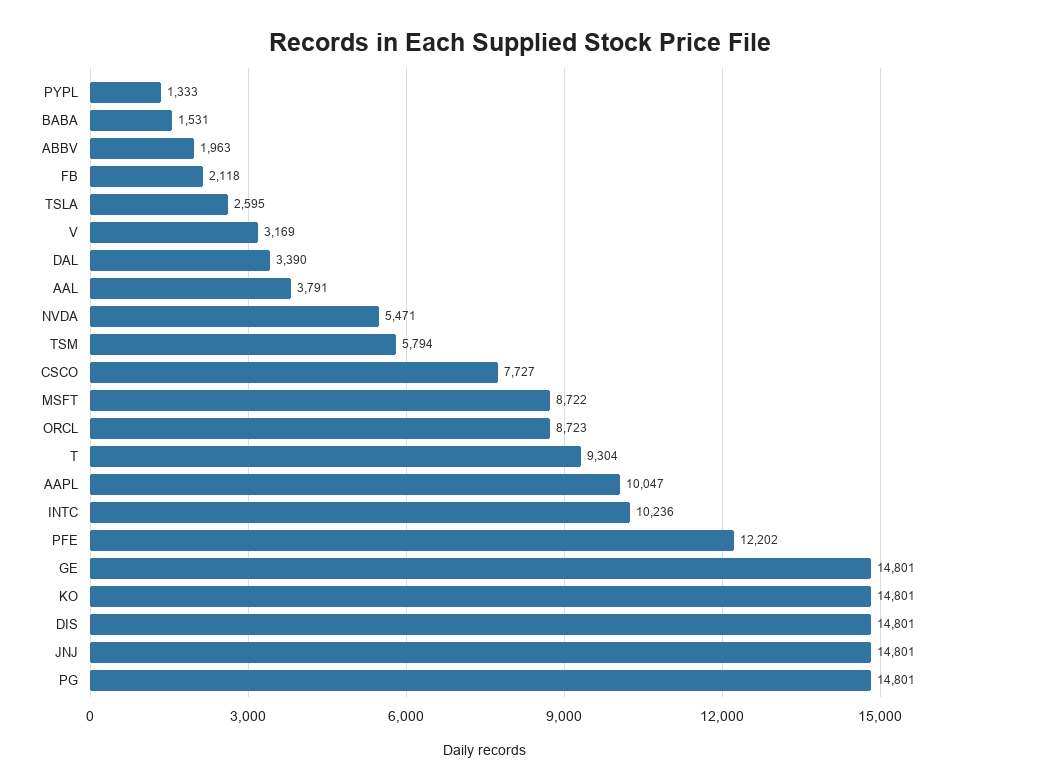
Figure 1. The files cover different listing histories, so their record counts vary substantially.
This variation is a practical reason to avoid assumptions such as “every file contains the same number of rows.” The combination logic should read each file until it ends.
Open the complete folder in PyCharm
The expected layout places project1 inside the course toolkit project:
toolkit/
├── toolkit_config.py
└── project1/
    ├── README.txt
    ├── TICKERS.txt
    ├── zid_project1.py
    └── data/
        ├── aapl_prc.dat
        ├── baba_prc.dat
        └── ...
Open the toolkit folder as the PyCharm project, not only the Python file. The scaffold imports toolkit_config, so Python needs the toolkit root on its import path.
The student’s Week 4 configuration file defines the local toolkit location as PRJDIR. That value can contain a Windows path because it is personal configuration and is not submitted. The project module must build everything below that root with os.path.join():
ROOTDIR = os.path.join(cfg.PRJDIR, "project1")
DATDIR = os.path.join(ROOTDIR, "data")
TICPATH = os.path.join(ROOTDIR, "TICKERS.txt")
This is the portability idea the examiner cares about. Windows uses backslashes in displayed paths, while macOS and Linux use forward slashes. os.path.join() asks the operating system to apply the correct separator.
Hard-coding something such as C:\\Users\\Student\\PycharmProjects\\toolkit inside the submitted file may work on one laptop and fail immediately on the examiner’s computer. The personal root belongs in toolkit_config.py; the submitted module should only describe locations relative to that root.
Read README.txt before writing the parser
The .dat files are fixed-width text. There is no header row and no delimiter. The README defines six fields in this exact order:
| Position | Column | Width |
|---|---|---|
| 1 | Volume | 14 |
| 2 | Date | 11 |
| 3 | Adj Close | 19 |
| 4 | Close | 10 |
| 5 | Open | 6 |
| 6 | High | 20 |
| Total | 80 |
That total is an immediate sanity check. The audit found that all 172,121 supplied lines are exactly 80 characters long.
COLUMNS = [
    "Volume",
    "Date",
    "Adj Close",
    "Close",
    "Open",
    "High",
]

COLWIDTHS = {
    "Volume": 14,
    "Date": 11,
    "Adj Close": 19,
    "Close": 10,
    "Open": 6,
    "High": 20,
}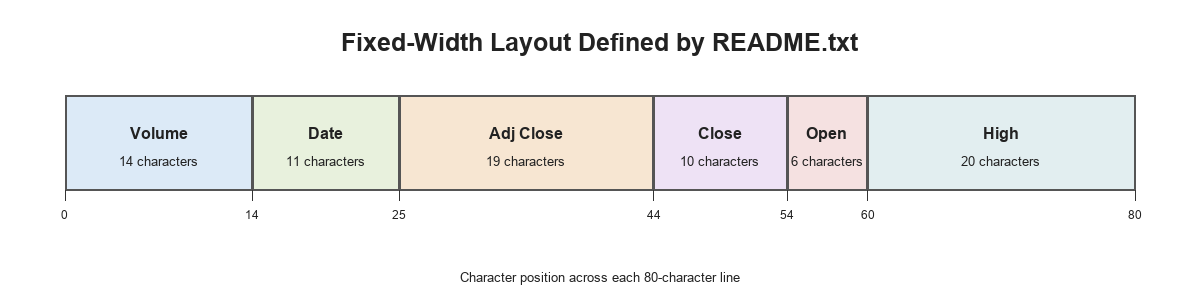
Figure 2. The end of one field is the start of the next; one wrong width shifts every value that follows.
The first Apple record demonstrates the format:
| Field | Parsed string |
|---|---|
Volume | 00000000000469 |
Date | 1980-12-12 |
Adj Close | 0.10126106441020966 |
Close | 0.12834821 |
Open | 0.1283 |
High | 00000000000.12890625 |
The leading zeros look unusual, but the function contract asks for strings. The parser should not invent scaling rules or convert the values to floats unless the scaffold explicitly requires that transformation.
Step 3: turn ticker lines into a dictionary
Each non-empty line in TICKERS.txt follows this pattern:
"NYSE"="T"
"NASDAQ"="AAPL"
The target structure is a lowercase dictionary:
{
    "t": "nyse",
    "aapl": "nasdaq",
}
A reliable parsing sequence is:
- Open the path passed into the function. Do not silently use the global
TICPATHinstead. - Iterate through the file one line at a time.
- Remove surrounding whitespace and quotation marks.
- Split the cleaned text at
=. - Store the ticker as the key and the exchange as the value.
- Convert both to lowercase.
The requirement that get_tics(pth) use its pth argument is easy to underestimate. Hidden tests can provide a different ticker file. A function that always reads the global path may work with the supplied data while failing the test designed to measure adaptability.
The duplicate INTC entry also provides a useful dictionary lesson. Assigning the same key twice replaces its earlier value. Here both values are nasdaq, so the final mapping remains consistent. In a production pipeline, conflicting duplicate values would deserve an explicit validation error.
Step 4: read each stock file with a context manager
The data filename follows a predictable pattern: <ticker>_prc.dat. The reader can combine DATDIR with an f-string filename:
filename = f"{tic}_prc.dat"
path = os.path.join(DATDIR, filename)

with open(path, mode="r") as file_object:
    lines = [line.rstrip("\n") for line in file_object]
The with statement is part of the Week 5 file-handling material. It closes the file automatically when the block ends, including when an exception interrupts the operation. Page 10 of the project brief makes this a marking requirement: any function that opens a file must use a context manager.
Use rstrip("\n") when the goal is specifically to remove newline characters. Plain strip() removes leading and trailing spaces too. That distinction matters in fixed-width data because padding can be meaningful to the field layout.
For more practice with this pattern, the Python file-handling guide explains read modes, context managers, and JSON writing.
Step 5: parse one line by moving a boundary
The parser needs one running position. Start at character zero, read the width for the current column, slice that section, then move the starting position forward.
result = {}
start = 0

for column in COLUMNS:
    width = COLWIDTHS[column]
    end = start + width
    result[column] = line[start:end].strip()
    start = end
After six iterations, start should equal 80. That gives the student a direct test:
assert sum(COLWIDTHS.values()) == 80
assert len(line) == 80
These assertions are useful while developing, even if they are not retained in the submitted function. They catch a schema error before the code produces plausible-looking but misaligned values.
The result values remain strings because the line_to_dict docstring says each value is a string. Converting to floats would change the required return type and could remove formatting such as leading zeros.
Steps 6 and 7: validate optional selections
The two validation functions follow the same idea:
verify_tickerschecks a requested ticker list against the keys returned byget_tics.verify_colschecks a requested column list againstCOLUMNS.
Both parameters are optional. None means the caller did not request a subset, so it is valid. An empty list is different: it explicitly requests no items and must raise an exception under the supplied docstrings.
The decision sequence is therefore:
if selection is None:
    accept it
else if selection is empty:
    raise an exception
else if any item is invalid:
    raise an exception
Ticker and column matching is case-sensitive. aapl is valid when it is a dictionary key; AAPL is not automatically converted inside the validator. Likewise, Close and close are different column names.
This may feel strict, but it makes the program predictable. The caller either supplies the documented format or receives an immediate error instead of an incomplete JSON file.
Step 8: build the nested data dictionary
The integration function combines all earlier pieces. Its output has one top-level key per ticker. Each ticker maps to its exchange and a list of parsed daily records:
{
    "aapl": {
        "exchange": "nasdaq",
        "data": [
            {"Date": "1980-12-12", "Close": "0.12834821"},
            ...
        ]
    }
}
The function must handle four cases:
tickers_lst | col_lst | Expected scope |
|---|---|---|
| A list | A list | Requested tickers and requested columns |
None | A list | Every mapped ticker and requested columns |
| A list | None | Requested tickers and all six columns |
None | None | Every mapped ticker and all six columns |
That is why the original optional defaults must remain in the function signature. Removing them changes the interface and makes the two None behaviours impossible to call as designed.
A clean control flow is:
- Validate both optional inputs.
- Replace
Nonewith the full available ticker or column list. - For each ticker, call
read_dat. - Convert every line with
line_to_dict. - Keep only the requested columns in each record.
- Store the exchange and filtered record list under that ticker key.
The output uses dictionaries because the reader needs named lookup at two levels: ticker to company data, then column name to field value. The Python data-structures guide explains why a dictionary fits this relationship better than a position-only list.
Step 9: write the result to JSON
The final function receives the completed dictionary and the exact output path supplied by its caller:
with open(pth, mode="w") as file_object:
    json.dump(data_dict, file_object, indent=4)
json.dump writes a Python object to an open file. json.dumps returns a JSON-formatted string instead. The assignment names both methods because students need to recognise the distinction.
Indentation is not essential to JSON validity, but it makes the generated file easier to inspect during development. The JSON output is not submitted; the examiner marks the Python module.
The function signatures are part of the assignment contract
The marking guide explicitly says not to modify function names or parameters. Hidden tests call those functions with the original signatures. A function can contain sensible logic and still fail every test if its arguments have been renamed, reordered, or made mandatory.
These are the interfaces the scaffold establishes:
get_tics(pth)
read_dat(tic)
line_to_dict(line)
verify_tickers(tic_exchange_dic, tickers_lst=None)
verify_cols(col_lst=None)
create_data_dict(tic_exchange_dic, tickers_lst=None, col_lst=None)
create_json(data_dict, pth)
The same rule applies to docstrings. In Python, a function’s docstring must be the first statement inside the function. A triple-quoted block placed after executable code or after return is only an unused string literal; tools such as help() will not see it as documentation.
What the supplied completed script gets wrong
The completed file provided with the source material is useful as a debugging exercise, but it should not be presented as a correct solution. A static comparison against the brief found several material problems:
- The project root points to the wrong folder. It uses
cfg.PRJDIRdirectly instead of joining theproject1subfolder. That makes the data and ticker paths resolve outside the supplied project layout. - The schema does not match
README.txt. The script defines eight fields, includingIDandLow, with widths totalling 85 characters. The actual files contain six fields totalling exactly 80 characters. - The parser invents numeric scaling.
line_to_dictdivides several fields by arbitrary factors, then divides them a second time. The docstring requires unconverted strings. - Several signatures were changed. The validator arguments are reordered or renamed, optional defaults are removed, and
create_jsonuses different parameter names and a default filename. - The validators do not implement the empty-list rules. An empty list passes even though the docstrings require an exception.
Noneis not supported in the integration function. The rubric specifically tests the all-ticker and all-column defaults.- The original imports were modified. The brief says not to change import statements or add modules.
- Docstrings appear after executable code. Several are unreachable after
return, so they no longer document the functions. - All optional test calls run automatically. That creates side effects whenever the module is executed and can obscure the first real failure.
- The open-ended responses are indented inside
create_json. They are not in the designated module-level answer section.
The width mismatch is the most revealing error. An 85-character schema cannot correctly parse an 80-character line. The code may still return dictionaries, but the values are attached to the wrong names or sliced from the wrong positions. Output that looks structured is not necessarily output that is correct.
Test the contract, not just the happy path
The scaffold includes optional test functions, but students should add small checks around the cases most likely to appear in marking:
- a different path passed to
get_tics; - a ticker file containing blank lines;
- a requested ticker that does not exist;
- an empty ticker list;
tickers_lst=None;- an invalid column name;
- an empty column list;
col_lst=None;- the first and last line of a data file;
- the sum of all field widths;
- a JSON path chosen by the caller.
Also test from a clean PyCharm run configuration. The submitted module must not depend on a current working directory, a personal absolute path, or an extra file that the examiner will not receive.
How to approach the finance questions without writing unsupported claims
The open-ended section begins with two competing explanations for negative financial articles:
- Journalists reflect investors’ existing evaluations of firms.
- Journalists provide information beyond firm fundamentals already known to investors.
The hypothetical observation is that more negative wording is followed by lower short-run returns with no long-run reversal. A temporary sentiment effect would normally suggest that prices later move back when the initial reaction fades. The absence of reversal is therefore more consistent with the information explanation than with a purely transitory opinion effect.
That wording needs care. “More consistent with” is stronger reasoning than “proves.” The scenario does not describe controls for earnings announcements, firm news, market returns, publication timing, or reverse causality. Those omissions limit a causal conclusion.
If articles contain new information, trading volume may rise in the short run because investors update their positions, disagree about interpretation, or rebalance at different speeds. The sign of the price response and the size of the volume response answer different questions: return measures direction, while volume measures how much trading activity occurs.
Three media sources need three measured variables
Students can choose sources such as a financial wire service, a major business newspaper, and a retail-investor platform. The important step is making each one measurable over the same firm-date window.
For each source, a study could construct:
- a tone or sentiment score;
- the number of relevant articles or posts;
- publication timestamps;
- firm identifiers;
- a source-specific accuracy or credibility measure where available.
To study substitution and complementarity, a regression needs source-specific variables rather than one combined “news sentiment” term. A starting specification could explain abnormal return or abnormal volume using three source-tone measures, firm and date controls, and interaction terms.
The interpretation is not simply “two significant coefficients mean complements.” Complementarity is better supported when the joint presence or interaction of two sources adds explanatory power beyond either source alone. Substitution is more plausible when one source’s incremental contribution becomes small after another source is included, or when readers shift attention from one source to the other.
This is an econometric design question, so the answer should also mention controls, timing, standard errors, and the difference between prediction and causation.
Article accuracy requires a dated, testable claim
An article is not accurate merely because the stock later rises or falls in the direction implied by its tone. Price movement can reflect unrelated news.
A stronger accuracy review would:
- Extract a factual claim from the article.
- Record what information was available at publication time.
- Compare the claim with primary evidence such as a regulatory filing, audited report, earnings release, or later correction.
- Separate factual accuracy from opinion, forecast quality, and writing tone.
- Record uncertainty when the claim cannot be independently verified.
Accuracy may remain unresolved when the claim concerns private intentions, unverifiable sources, disputed estimates, future outcomes, or data that were unavailable to the public. “Unknown” is a valid conclusion; it is better than forcing every article into correct or incorrect.
A practical pre-submission checklist
Before pasting the module into the submission system, verify the following:
- The file retains the original imports, function names, and parameters.
- Only the marked completion areas were edited.
- No submitted path contains a literal slash, backslash, username, or drive letter.
ROOTDIR,DATDIR, andTICPATHpoint to the intended locations.COLUMNSfollows the README order.COLWIDTHScontains six integer values totalling 80.- Every file-opening function uses
with open(...). get_ticsreads its argument rather than a global path.line_to_dictreturns six string values.- Empty lists raise exceptions while
Noneactivates the documented defaults. - The nested dictionary contains the requested tickers and columns only.
- JSON is written to the path supplied by the caller.
- Open-ended answers are concise, commented out, and placed in the designated section.
- Optional debugging prints and test calls are disabled before submission.
Common questions about this fixed-width Python project
Why not use pandas to read the files?
The supporting instructions say that the pandas part of Week 5 is not required. The project is designed to assess strings, slicing, loops, dictionaries, functions, modules, exceptions, file I/O, and JSON.
Why must the parsed values remain strings?
That is the return type specified by the line_to_dict docstring. Type conversion would change the contract and could remove meaningful formatting such as leading zeros.
Why does the duplicate INTC line not create 23 dictionary entries?
Dictionary keys are unique. Assigning intc a second time replaces its earlier value. Because both source lines map it to NASDAQ, the final value remains consistent.
Why does the examiner care about os.path.join()?
The code is marked on another computer. Joining paths from a configurable project root avoids embedding one student’s Windows username or relying on an operating-system-specific separator.
Can a parser be wrong even if it returns a dictionary?
Yes. If the widths or order are wrong, Python will still create keys and values, but each slice can contain the wrong characters. Validate the total width and inspect a known line before trusting the output.
Should the test functions remain enabled?
Use them while developing, one at a time. Disable automatic test calls and debugging prints before final submission unless the brief explicitly requires them.
Expert and source note
This educational walkthrough was prepared from the supplied 10-page project description, Week 1-5 lecture material, Additional Instructions document, starter scaffold, README.txt, TICKERS.txt, 22 stock-data files, and completed Python script. The technical audit inspected all 172,121 raw lines and compared the completed file statically with the scaffold and marking rules. The supplied code was treated as evidence and was not executed.
Students who need help understanding portable paths, fixed-width parsing, dictionaries, or JSON can review our Python programming assignment help and Python file-handling guide pages before implementing their own version.
Stuck on a Python assignment? We ship working code with a walkthrough.